I wanted to know what actually limits how fast a small language model runs, and I wanted numbers I could trust. The usual answer is two rules: memory capacity decides which model fits, and memory bandwidth decides how fast it writes. I spent two weeks testing how far that goes on the three devices I had: an Arduino UNO Q, a Raspberry Pi 5 and a Mac mini with an M4, each writing one answer at a time (single-stream decoding; batching has its own section). Claude Code wrote the harness and ran most of the measurements. I’m a systems electrical engineer, not an ML person, so I wanted a method that rests on real data.
What I found, in three parts:
- The bandwidth rule holds on the Pi and the M4 and fails on the UNO Q. There the evidence points to instruction overhead in its small cores’ 4-bit kernel, not to memory or multipliers. That is an inference from instruction counts and scaling tests, not a look at what the cores are doing. A written token costs the UNO Q about half a joule.
- Operating points can behave in surprising ways. The Pi’s 2000 MHz step is in its path to memory, not its cores, and a hot Pi is slow because its firmware lowers the clock; I found no direct effect of temperature at a fixed clock.
- Software settings can matter more than hardware. Constraining a small model’s reply to a JSON schema took a smart-home test from 5 of 30 right actions to 28 of 30, and one server setting cut the wait for the first word from about 16 seconds to under 2.
The devices are the demonstration, not the subject. I would like to test additional devices in the future, ones more tailored for AI compute. A table near the end says how much evidence stands behind each finding.
The method, in five habits
- Anchor first: reproduce a published number with the same tool, settings and model file before trusting my own, and explain any gap over about 10%.
- Log the device’s state every second (clock, temperature, throttle flags, load, memory, power where available) and give every run a verdict. A run whose state breaks the test’s assumption is flagged, never averaged in.
- Keep a claims register: one row per number I might repeat, with its status, the real data behind it and its caveats, and a script that recomputes every number from that data. Retractions stay on record.
- Write the prediction before the run, so the result can prove it wrong.
- Measure the roofline reference rates (read bandwidth, int8 multiply rate) on the device itself and place every workload against them. That turns “it is slow” into “here is what it is short of”.
Who did what: I defined the method and decided each step of the evaluation (what to measure next, how each run could fail, which hardware, every review). Claude Code wrote the harness, the scripts and the first drafts of the notes, and started sub-agents for some runs and for audits. I cannot review its code line by line, which is why every number comes from real data I can check, and why other Claude sessions re-read that data against the register (they found no register number wrong, and their wording fixes are in). Those are AI audits by the same kind of tool that wrote the code, not human or outside review. Scope: three ARM devices (four Mac configurations), the CPU path through llama.cpp release b11181 (the Apple anchor uses the build its table used) plus the M4’s Metal GPU. Energy is measured on the UNO Q (at its 5 V input) and on the Pi (board rails only), not yet on the same meter; accelerators and the Pi on that meter are the next posts.
Every number in this post has a row in that register, with the real data behind it, its status and its caveats. The register and that data are not published yet; publishing them, scrubbed and pruned, is on the future work list.
The devices
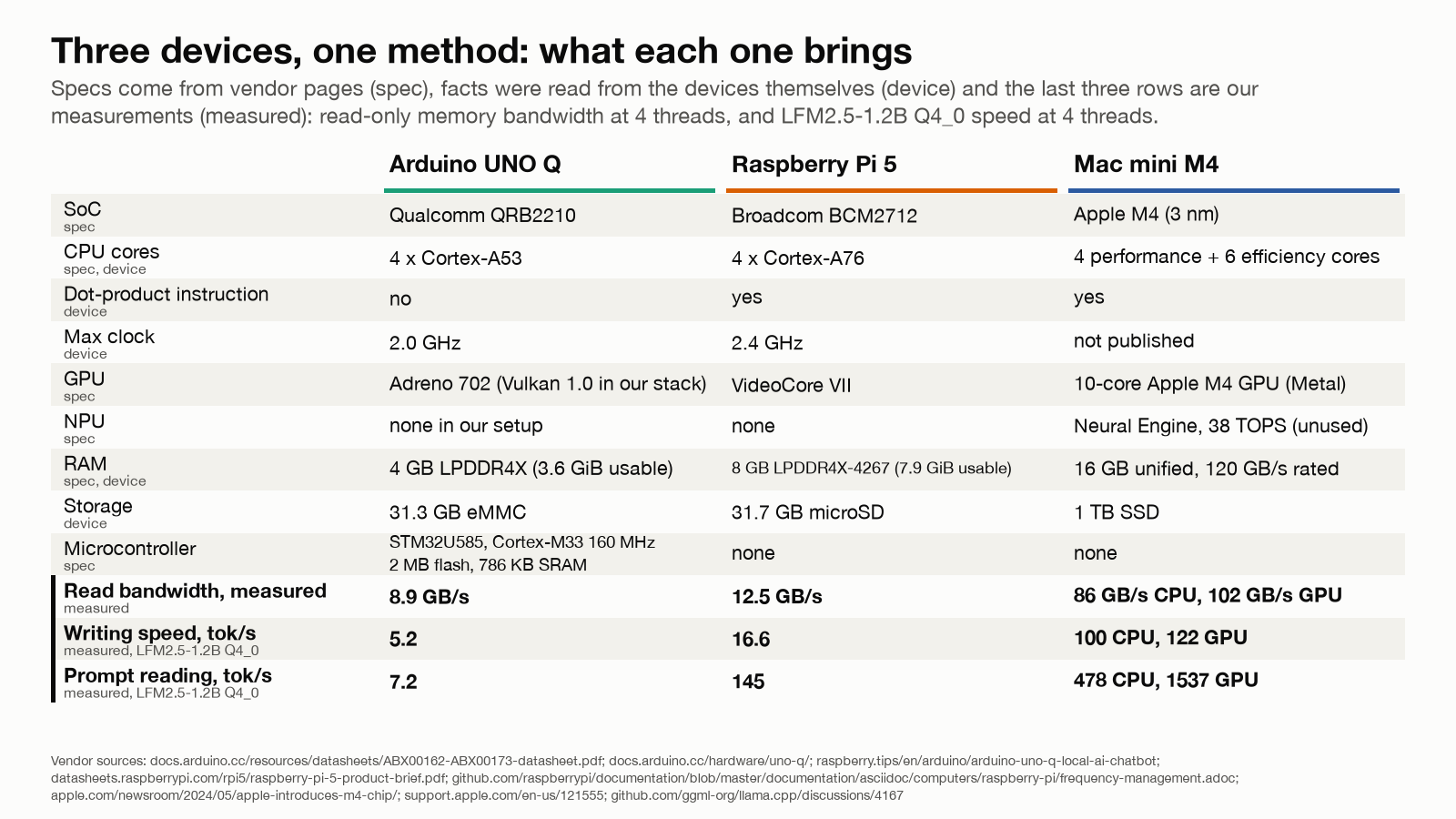
| Arduino UNO Q | Raspberry Pi 5 (8 GB) | Mac mini M4 (16 GB) | |
|---|---|---|---|
| SoC | Qualcomm QRB2210 | Broadcom BCM2712 | Apple M4 |
| CPU | 4x Cortex-A53, 2.0 GHz, in-order | 4x Cortex-A76, 2.4 GHz, out-of-order | 4 performance + 6 efficiency cores |
| int8 instructions | plain NEON, no dot-product (SDOT) | SDOT and fp16 | SDOT, fp16, int8 matrix multiply (unused by the macOS build) |
| GPU | Adreno 702 (Vulkan 1.0 in our stack) | VideoCore VII | 10-core Apple GPU (Metal) |
| NPU | none in our setup | none | 16-core Neural Engine, unused here |
| RAM | 4 GB LPDDR4X (3.6 GiB usable) | 8 GB LPDDR4X-4267 | 16 GB unified, 120 GB/s rated |
| Storage | 32 GB eMMC | 32 GB microSD | 1 TB SSD |
Facts from the vendor pages and the machines themselves, one named source per field. A note on the Pi: it does have a GPU (VideoCore VII); llama.cpp does not use it for language models here, so every Pi number below is a CPU number. The UNO Q also carries a microcontroller next to its Linux processor (an STM32U585 with 2 MB of flash and 786 KB of SRAM, from Arduino’s datasheet). A model has to fit in that, a different size class from the 1.2-billion-parameter files used here, so it is not part of these tests.
Two rules, and when they fail
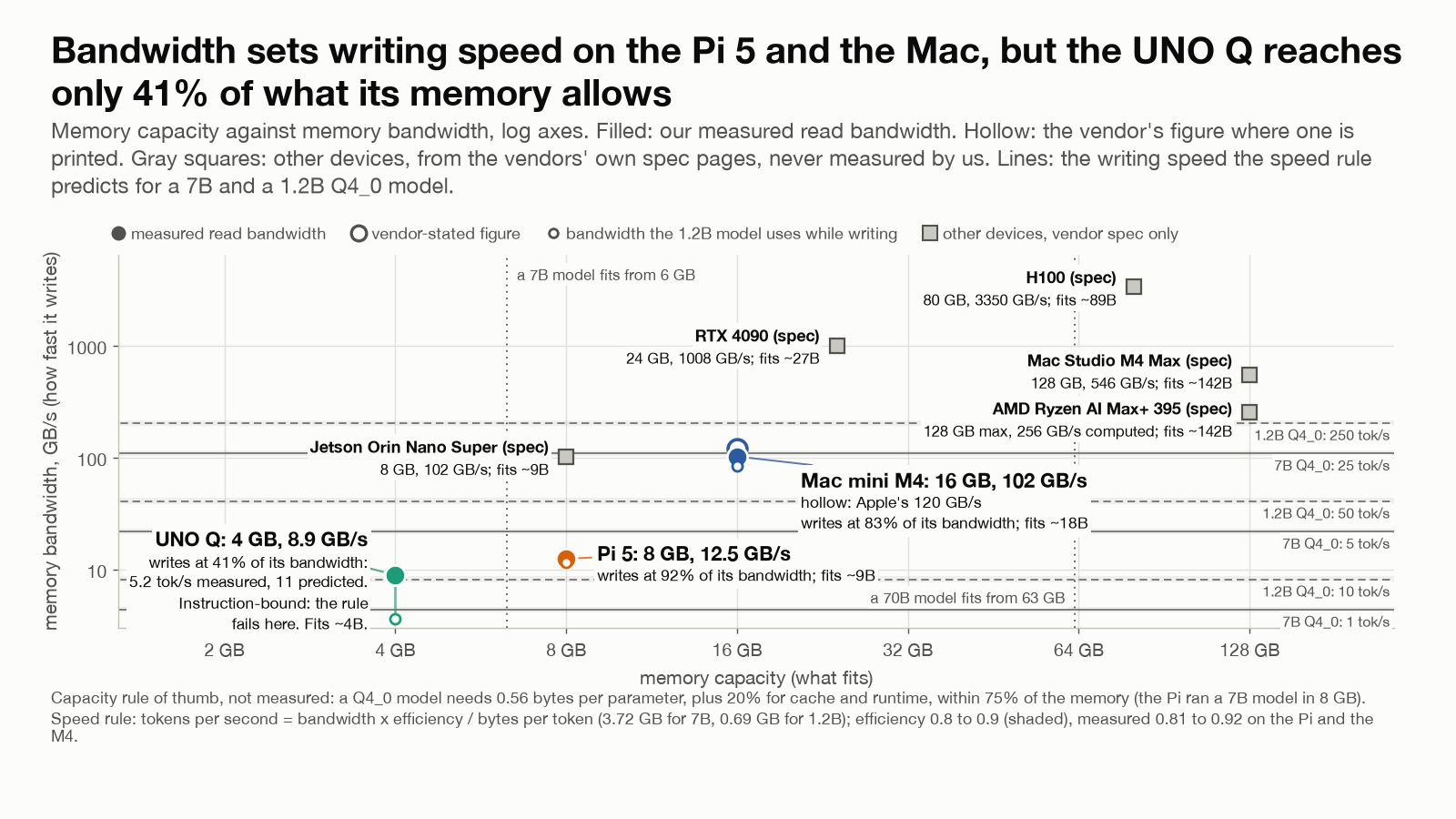
Capacity. Resident size is about parameters times bytes per parameter (0.5625 for Q4_0, about 0.6 for Q4_K_M, about 1.06 for Q8_0) plus the context cache and the runtime’s copies. One rule of thumb, a heuristic and not an allocation limit, says 75% of RAM is usable and the largest model, in billions of parameters, is the usable GB divided by 0.6. That is the Q4_K_M line of the arithmetic. It hides two things: small models’ “Q4_0” files keep the vocabulary table at 6 or 8 bits, 16 to 45% of the bytes a token reads, and repacking for dot-product kernels nearly doubles resident memory, 1366 MB on the Pi against 717 MB on the UNO Q for the same 4-bit 1.2B file.
Speed. Writing a token reads the weights that token uses once, so the rule is:
tokens per second ≈ measured read bandwidth × efficiency ÷ bytes read per token
The efficiency is about 0.9 for a chip running close to its measured read rate, which I call the memory wall. The bytes are the bytes actually read per token, not the file size or the resident memory: for a mixture-of-experts model they are far fewer than the file holds. Arithmetic is a second reference rate, and a run can sit below both. With the throttled chip’s own measured bandwidth, the rule predicted the Pi’s 7B model within 5%. It fails on the UNO Q, which writes at 41% of its measured bandwidth and 34% of its measured multiply rate at the same time: neither is the limit, and the sections below point to the instruction overhead of its kernel. At the efficiency the Pi and the M4 reach, the rule would overstate its speed about 2x.
The gray squares in the chart are bigger devices from their vendors’ spec pages, not measured by us. They show that capacity and bandwidth are bought separately: some have a lot of memory and moderate bandwidth, some the reverse.
Anchors first
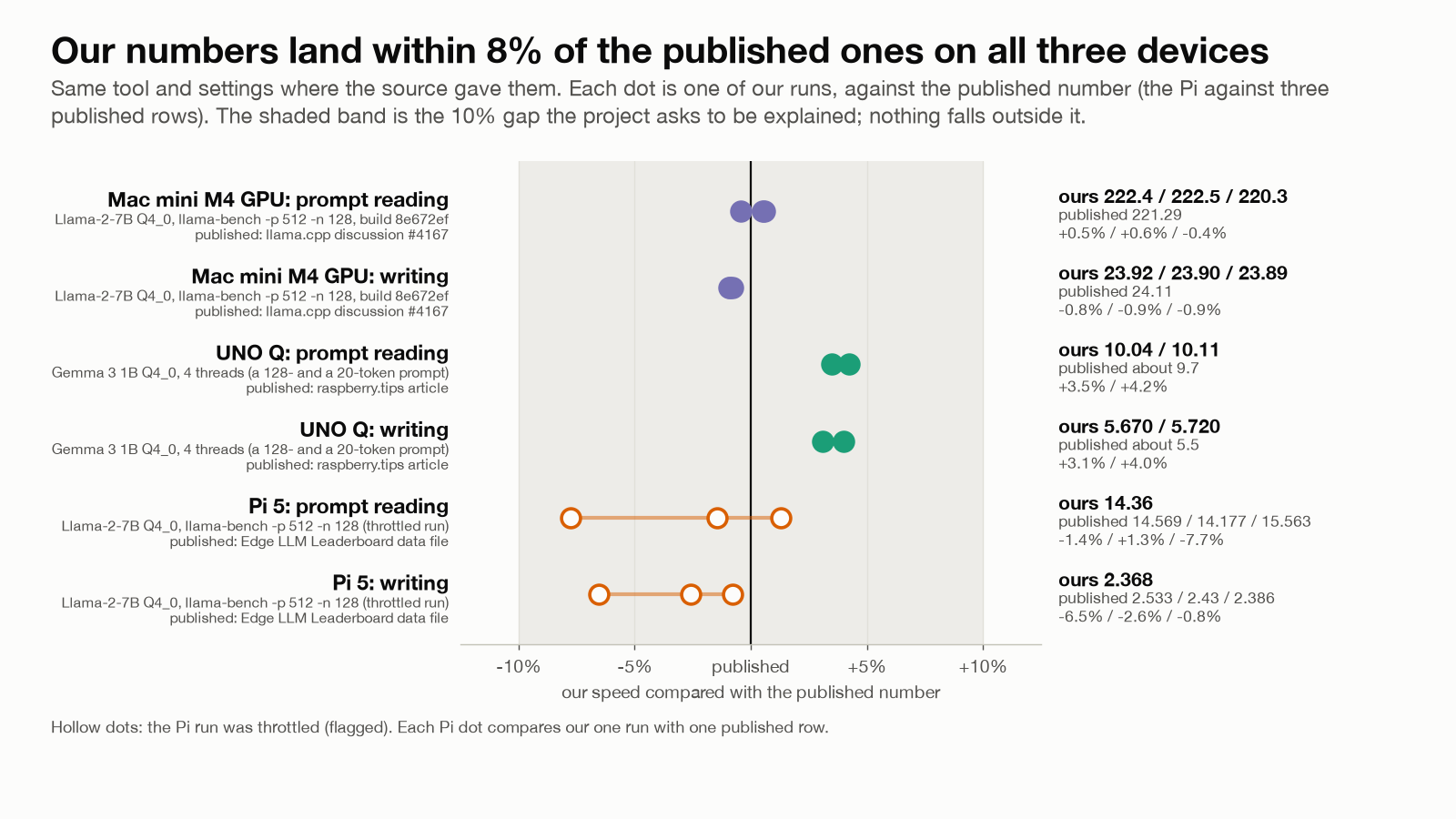
Each device has a published number we reproduced first. The M4 matches llama.cpp’s own Apple table within 1% on the exact 2023 build the table used (Llama-2-7B Q4_0: 222.4 vs 221.3 tokens per second reading, 23.9 vs 24.1 writing); a fourth run on a quieter machine gave 222.5 and 24.9, within 4%. The UNO Q matches the one published UNO Q figure within 4% (Gemma 3 1B Q4_0: 10.0 vs about 9.7 reading, 5.67 vs about 5.5 writing). The Pi lands within 10% of published Pi 5 rows for other 7B-class 4-bit files run with the same tool and settings (Llama-2-7B Q4_0: 14.4 reading, 2.37 writing; their build and cooling are not stated, so this one is a plausibility check rather than an exact anchor). That last one holds a miss: the prediction written before the run was 2.6 to 3.1 tokens per second, it landed at 2.37 because the passive case throttled the run, and the prediction from the chip’s hot ceilings, 2.47, was within 5%. Writing the prediction down is what made the miss visible.
Three machines, three limiters
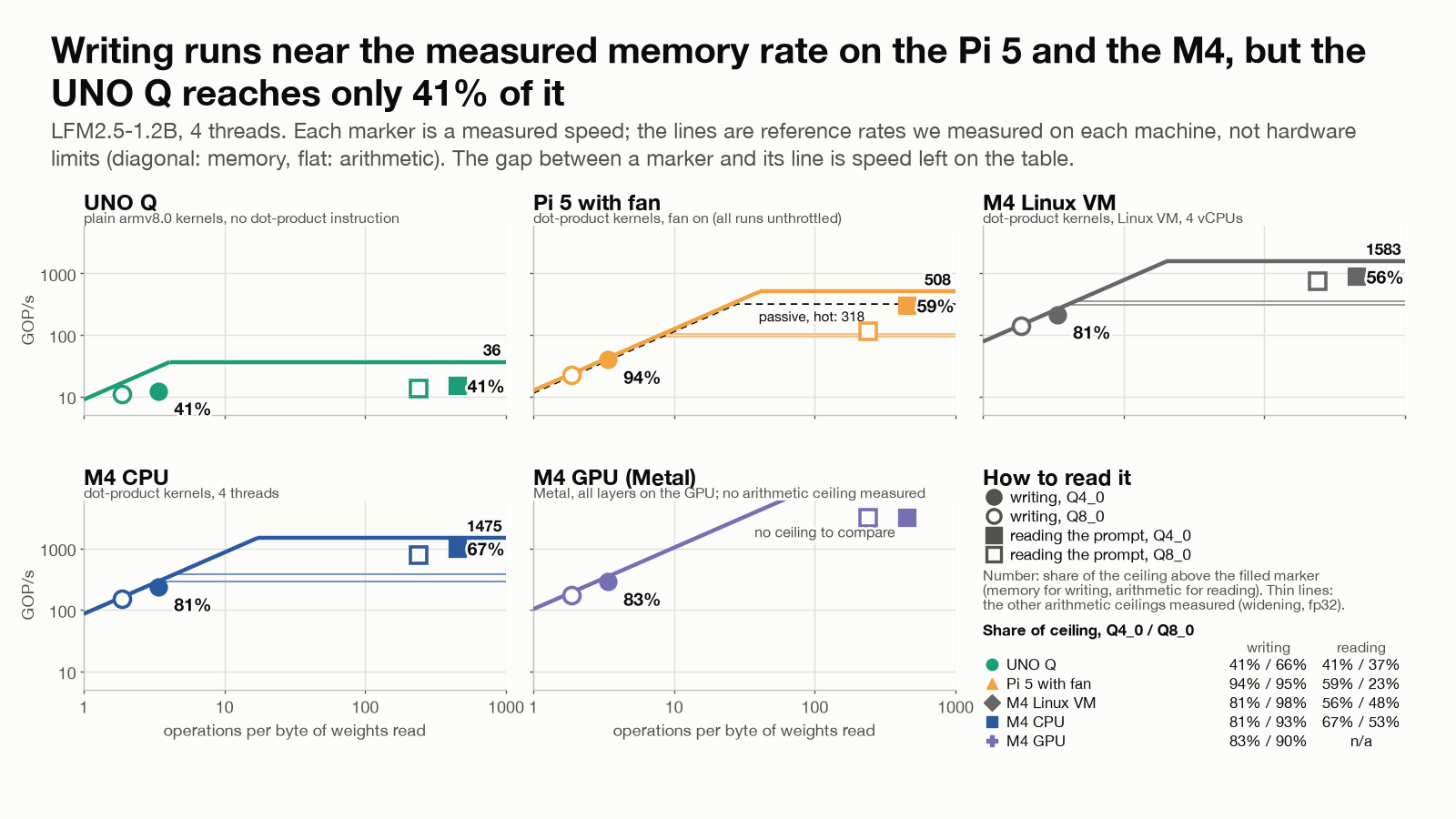
One small program, the same binary on every device, measured each one’s read bandwidth and int8 multiply rate. They are reference rates, not hardware limits: a streaming test is not llama.cpp’s access pattern (tensor boundaries, thread synchronization), so a share carries about 10% uncertainty. Against them, same 1.2B model, 4 bits, four threads: the Pi’s writing streams weights at 92% of its read rate (the chart plots the fan-cooled run, 94%) and the M4 CPU’s at 81 to 86% (90 to 93% at 8 bits), close to the read rate, the memory wall; the UNO Q reaches 41% of its read rate and 34% of its multiply rate, close to neither.
A GPU adds arithmetic more than bandwidth. On the M4, the Metal GPU reads a prompt at 1544 tokens per second against the CPU’s 523, 3.0 times faster, but writes at 130 against 98, only 1.3 times faster (1.2 times in the first run), about the ratio of their read rates, 102 against 86 GB/s; in the first run its writing sat at 83% of its own read rate, the same wall. The UNO Q’s GPU (Adreno 702, Vulkan 1.0) was 7.3 times slower than its CPU on a small vision model, and llama.cpp’s Vulkan backend needs a newer Vulkan, so no language model ran on it.
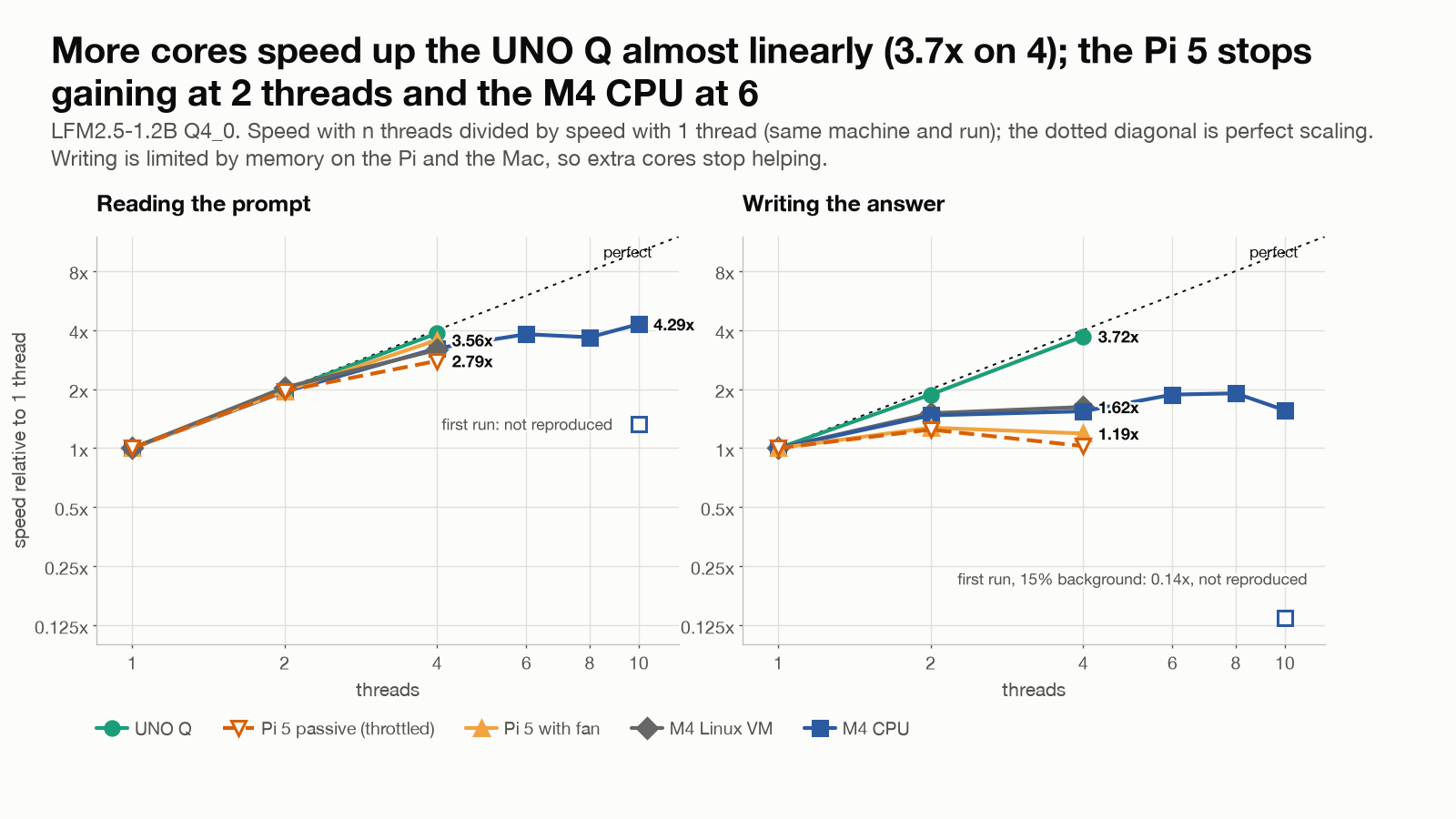
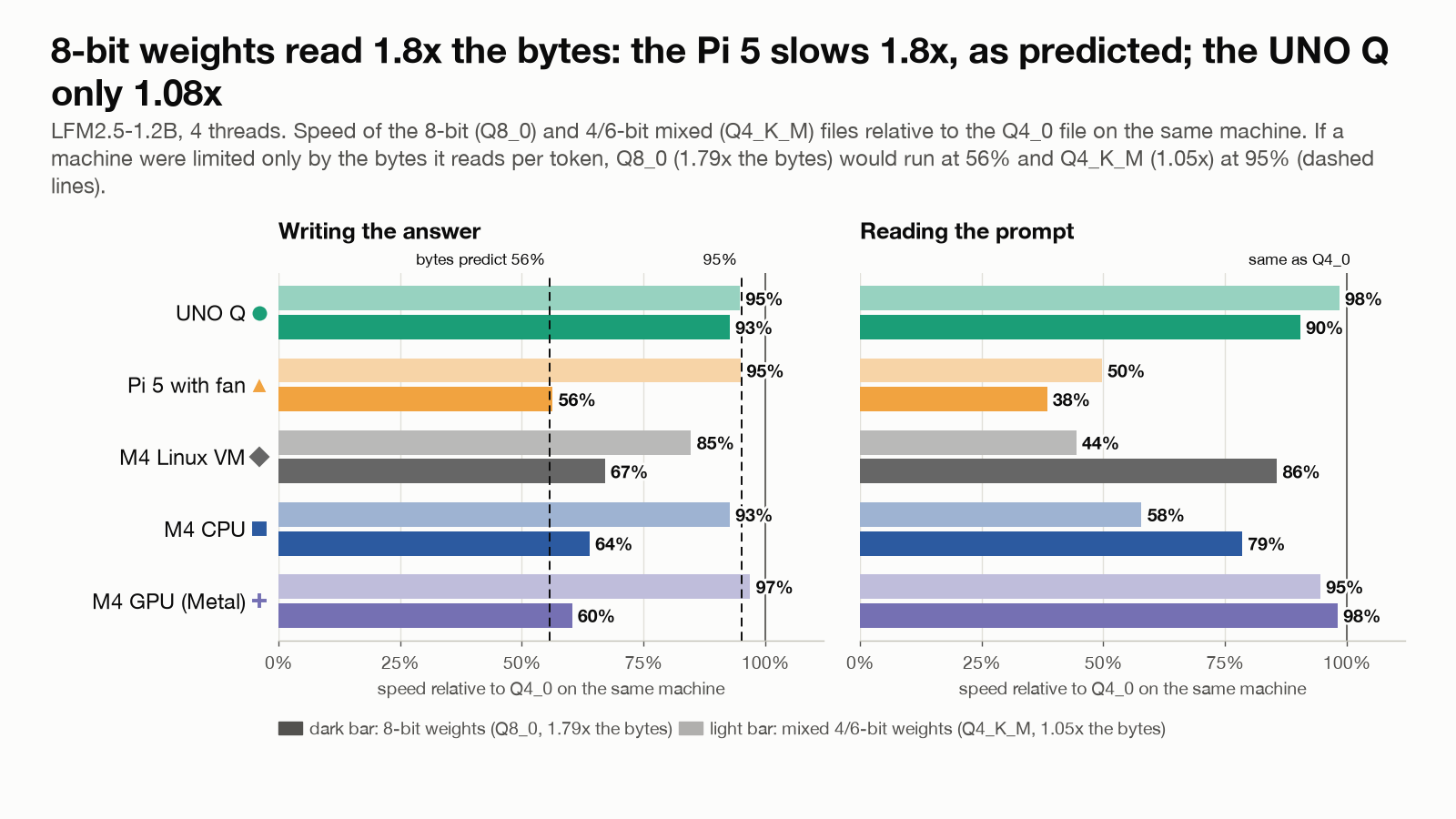
Two tests could have proved that wrong. A chip at the memory wall cannot speed up by adding cores once one core fills the bus: the Pi’s writing goes from 14.2 tokens per second on one thread to 16.9 on four while its prompt reading scales 3.6x; the UNO Q’s writing scales 3.7 to 3.8x. And an 8-bit file reads 1.79x the bytes of the 4-bit file per token, so a bandwidth-bound machine must slow to about 56%: the Pi slows to 56%, as predicted, the M4 CPU to 58 to 64%, the UNO Q keeps 93%. On the Arduino, nearly doubling the bytes costs almost nothing, because bytes are not what it is short of.
Inside the A53: count the instructions
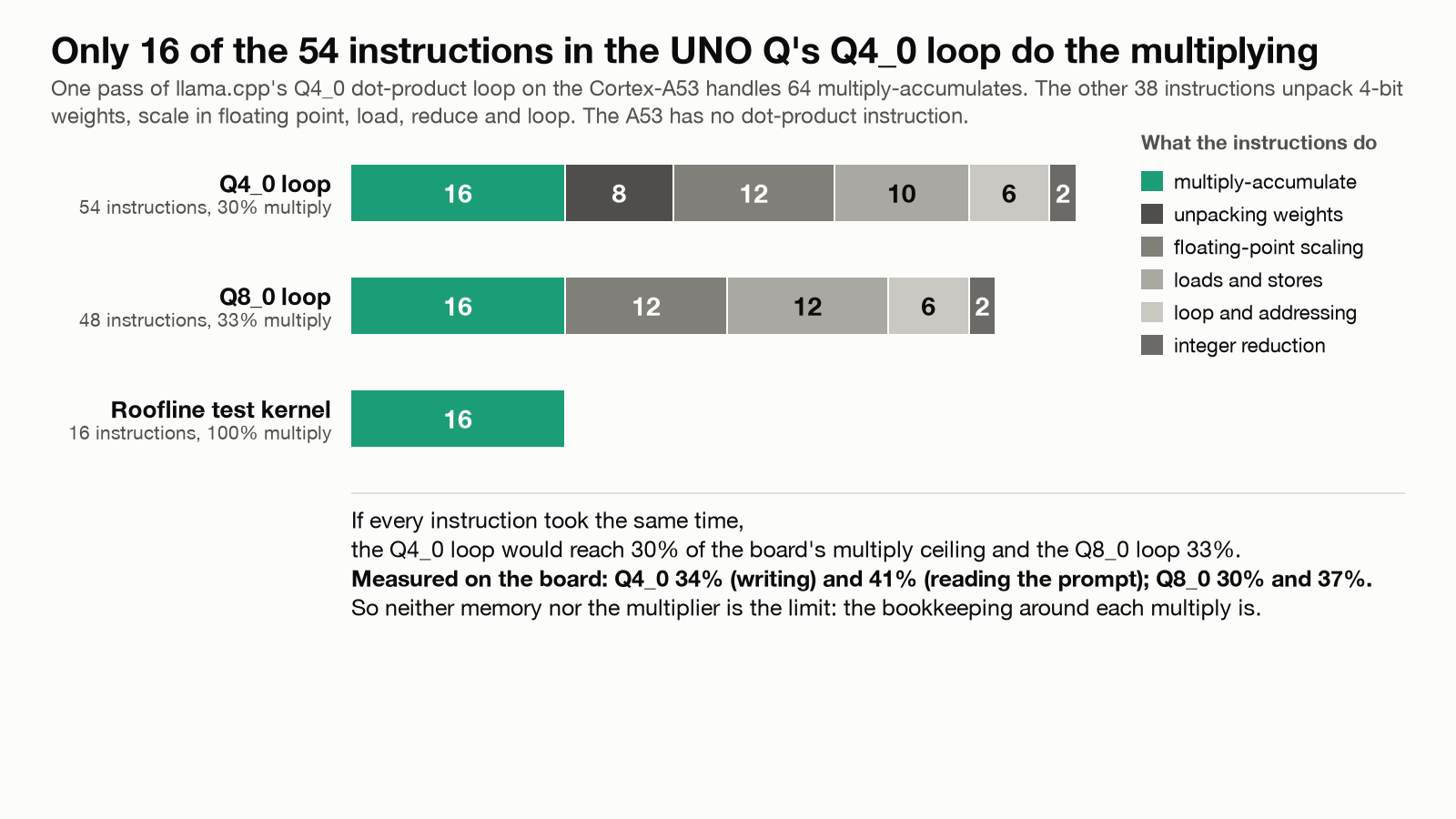
We disassembled the exact kernel library the board runs. The 4-bit inner loop spends 54 instructions per 64 multiply-accumulates and only 16 of them multiply; the rest load, unpack and rescale. The 8-bit loop needs 48, since nothing is unpacked. If every instruction took the same time, that predicts 30% (4-bit) and 33% (8-bit) of the multiply rate; I measured 33 to 41% and 31 to 37%. No runtime option changes it (all within 2%).
That points to instruction overhead without proving it. An instruction count says how much work there is, not how long it takes: dependencies between instructions, load latency and the in-order core’s issue rate could matter as much. The board exposes its Cortex-A53 performance counters, and reading them (instructions per cycle, cache misses, stalls) is the test that could contradict this; I have not done it. The memory reference rate sits well above the measured speed, so a faster kernel has headroom on paper, but how much a real kernel could realize is unmeasured.
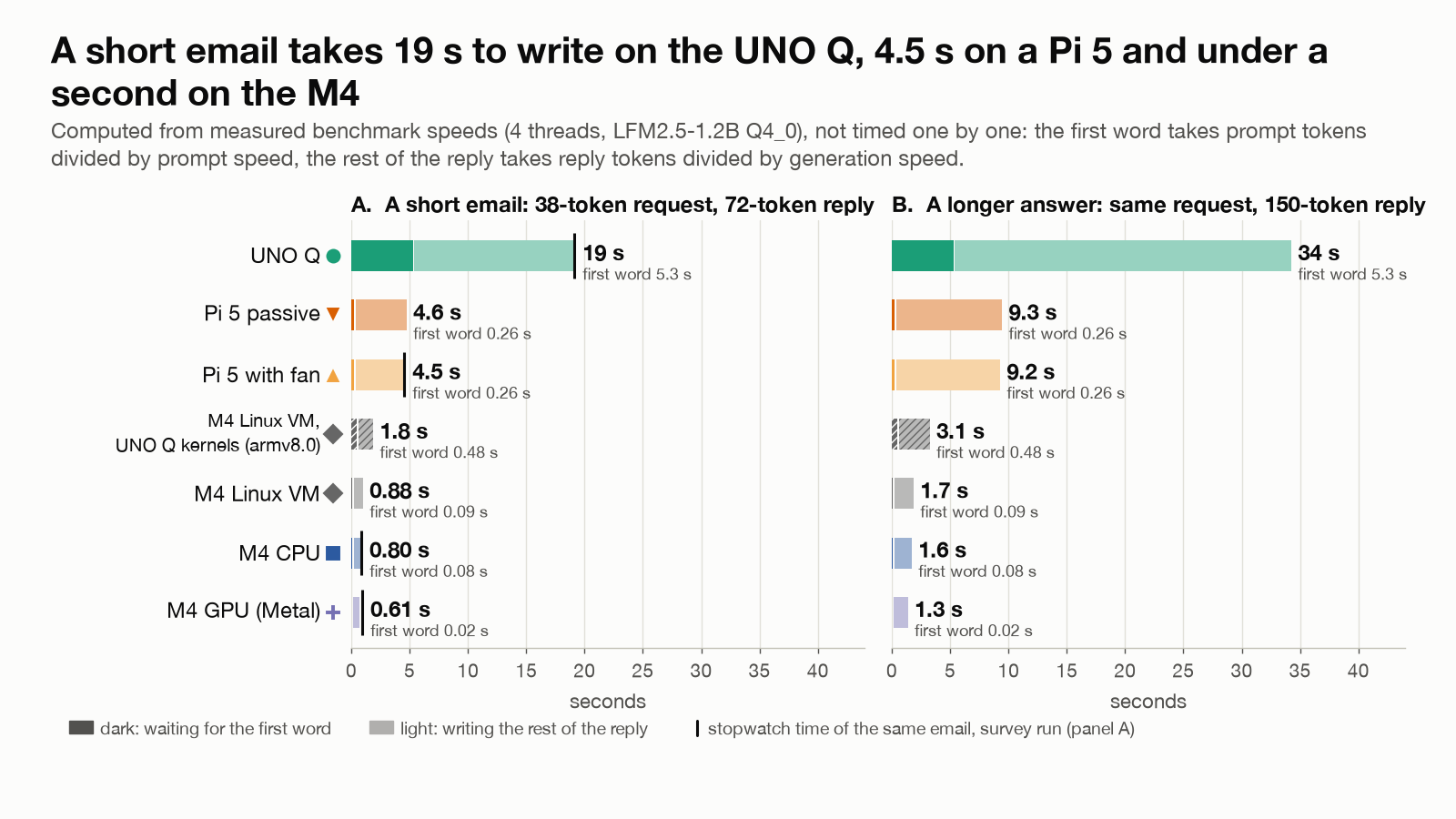
The same missing instruction decides how a prompt is read: reusing a weight across a block of tokens needs a blocked kernel, which on ARM needs the dot-product instruction. A 128-token prompt therefore raises the UNO Q’s arithmetic rate only 1.23x over writing one token, against 4.2 to 4.7x on the M4 CPU and 10.5 to 11x on its GPU. In practice a smart-home request with about 120 tokens of instructions takes 20.2 seconds on the UNO Q, 16.8 of them reading the instructions: the system prompt sets the wait, not the reply. (The latency chart computes a 72-token email from benchmark speeds; the 20.2 seconds is a measured request.)
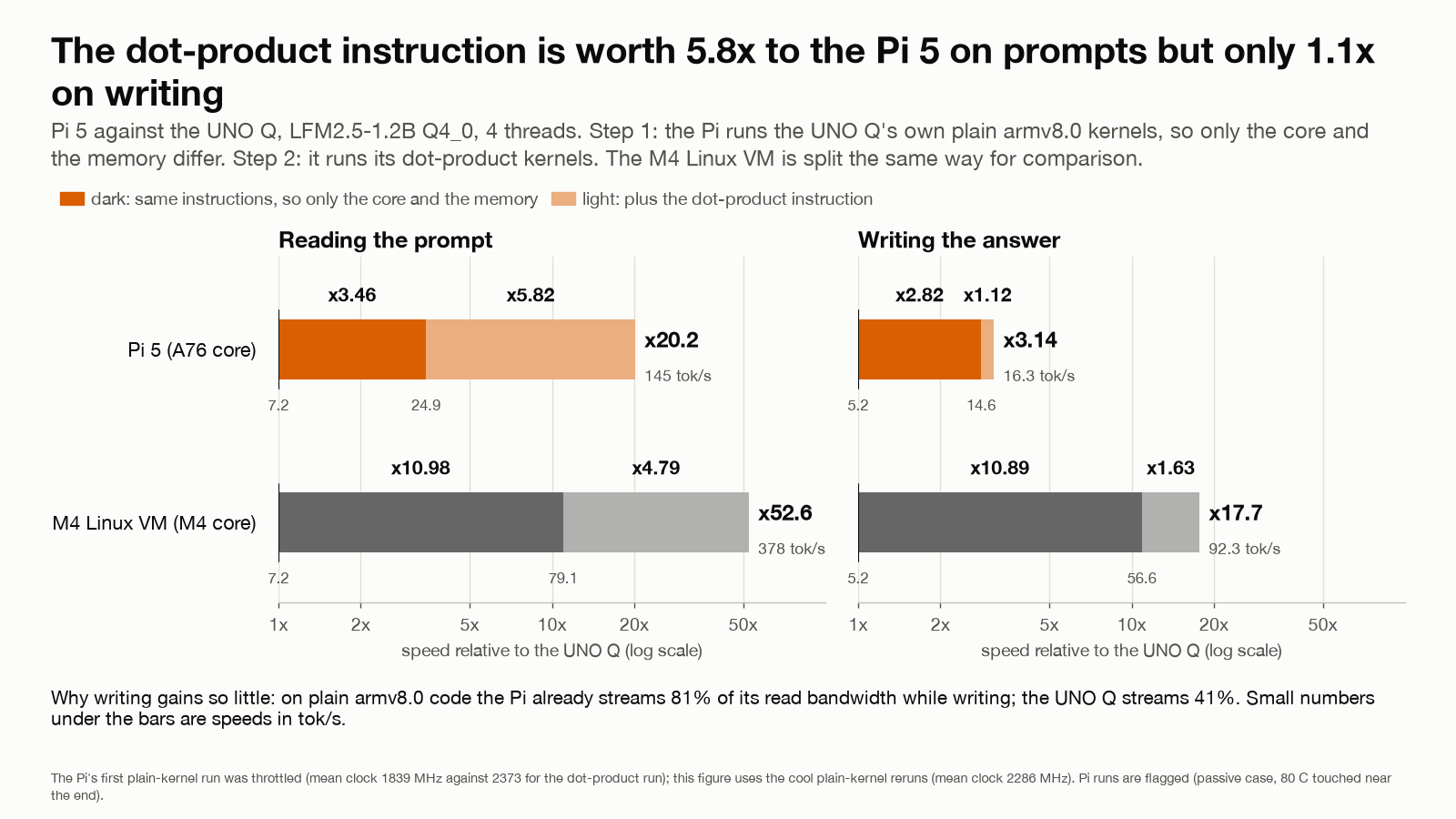
How much is the instruction and how much the core? We forced the Pi onto the UNO Q’s kernels. At clocks matched within 4% the A76 runs the same plain code 3.5x faster on prompts and 2.8x on writing than the A53 (core and memory system); its dot-product kernels then add 5.8x on prompts but only 1.1x on writing, because the plain loop already writes at 81% of the Pi’s bandwidth. An instruction helps only where it removes the bottleneck. (The first version of this split, 7.0x and 1.4x, compared a throttled run with unthrottled ones; the state logs showed it and cool reruns gave the figures above.)
Heat
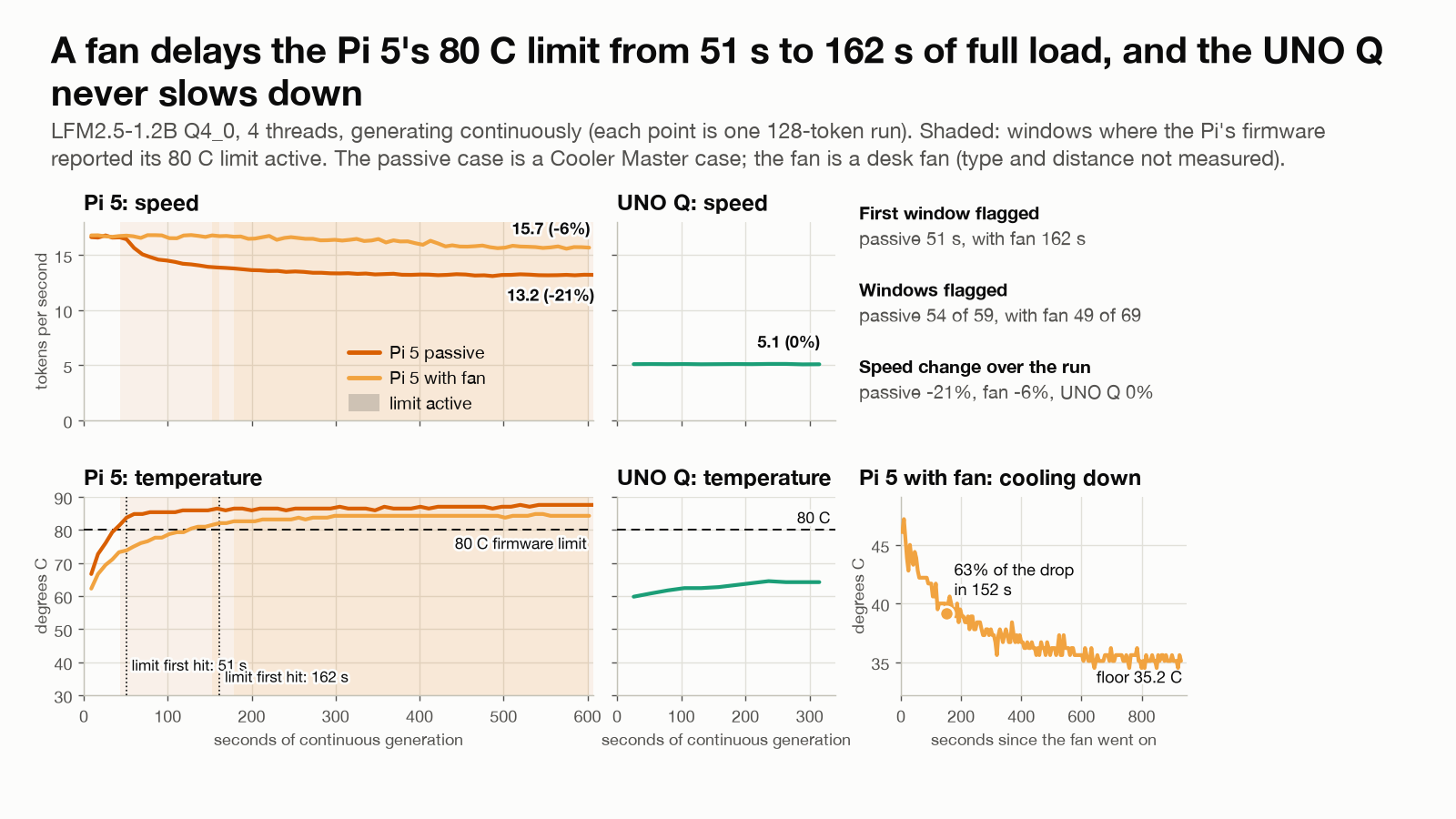
In a passive case the Pi 5 trips its 80 C limit within a minute of continuous writing. With the real clock recorded, the clock falls from 2383 to 1514 MHz (-36%) over ten minutes while writing falls from 16.6 to 13.2 tokens per second (-21%); speed went as the clock to the power 0.49, about half, as a memory-bound workload should. A desk fan delays the limit from 51 to 162 seconds and holds the loss to 6%. Measured on the throttled chip, the multiply rate fell 37% and the four-thread read rate 9%; the pinned-clock tests below point to the clock, not the heat. The trap: the standard Linux clock reading said 2.4 GHz through all of it, because it reports the clock requested, not delivered; every Pi clock column recorded before we noticed is marked wrong. The UNO Q never slowed through a 20-minute run at up to 74 C.
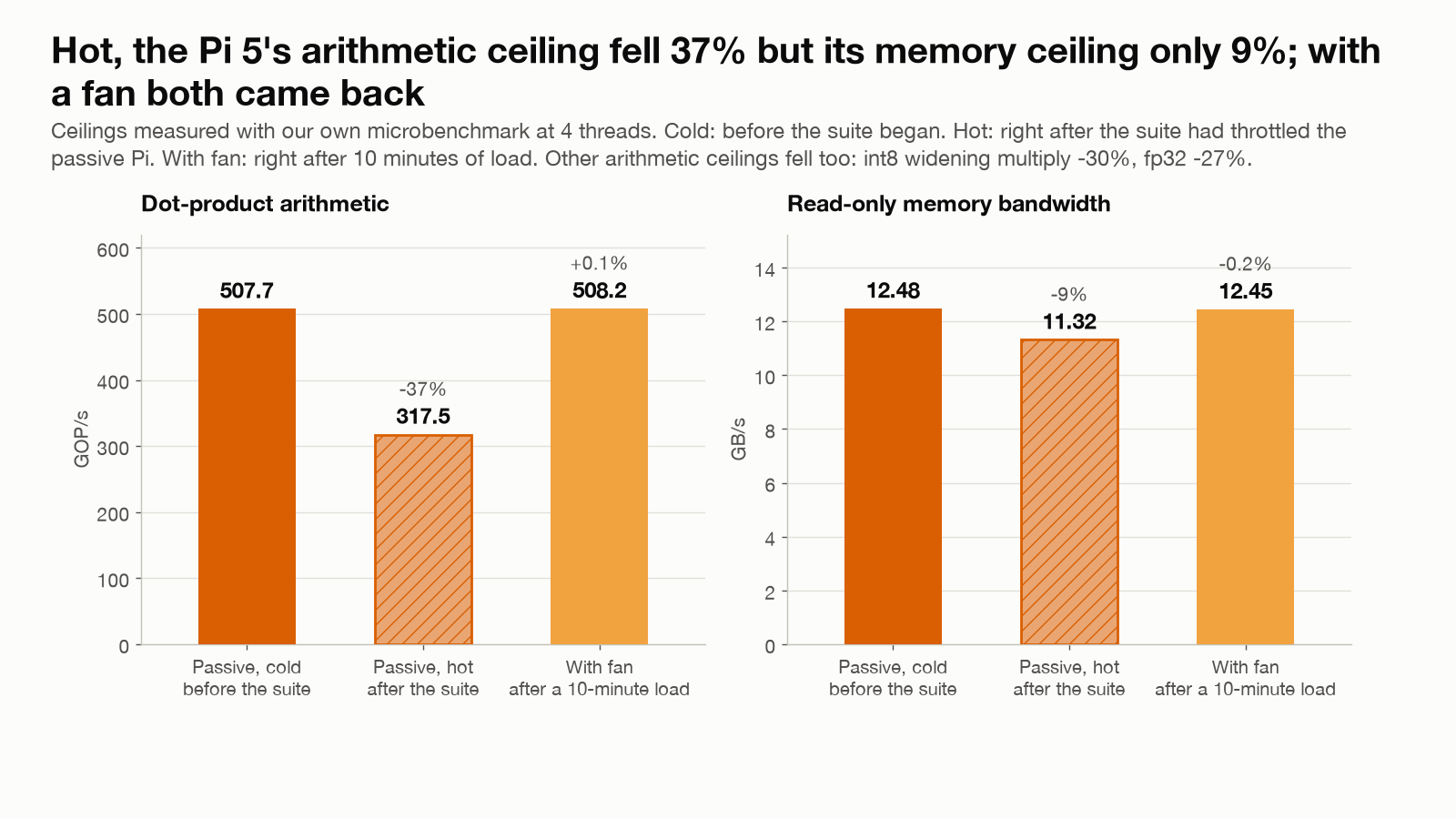
The direct test pins the clock at fixed steps from 1500 to 2400 MHz, twice in opposite orders, first in the passive case and then with a fan on the Pi. Two results. Within the temperatures I tested, I found no direct effect of heat at a pinned clock: the chip at 51 to 63 C writes as fast as the same chip at 65 to 81 C, within about 1%, 0.4 to 0.5% slower if anything. Each pinned step lasted under a minute, so a long soak at 80 C was not tested. So a hot Pi is slow because the firmware lowers its clock; the fan’s value is the delay before it does and the higher clock it settles at afterwards. And over the 60% of extra clock between 1500 and 2400 MHz, prompt reading gained 51% (speed went as the clock to the power 0.9) while writing gained only 23%: reading is arithmetic and follows the clock, writing waits on memory.
A faster clock that writes slower
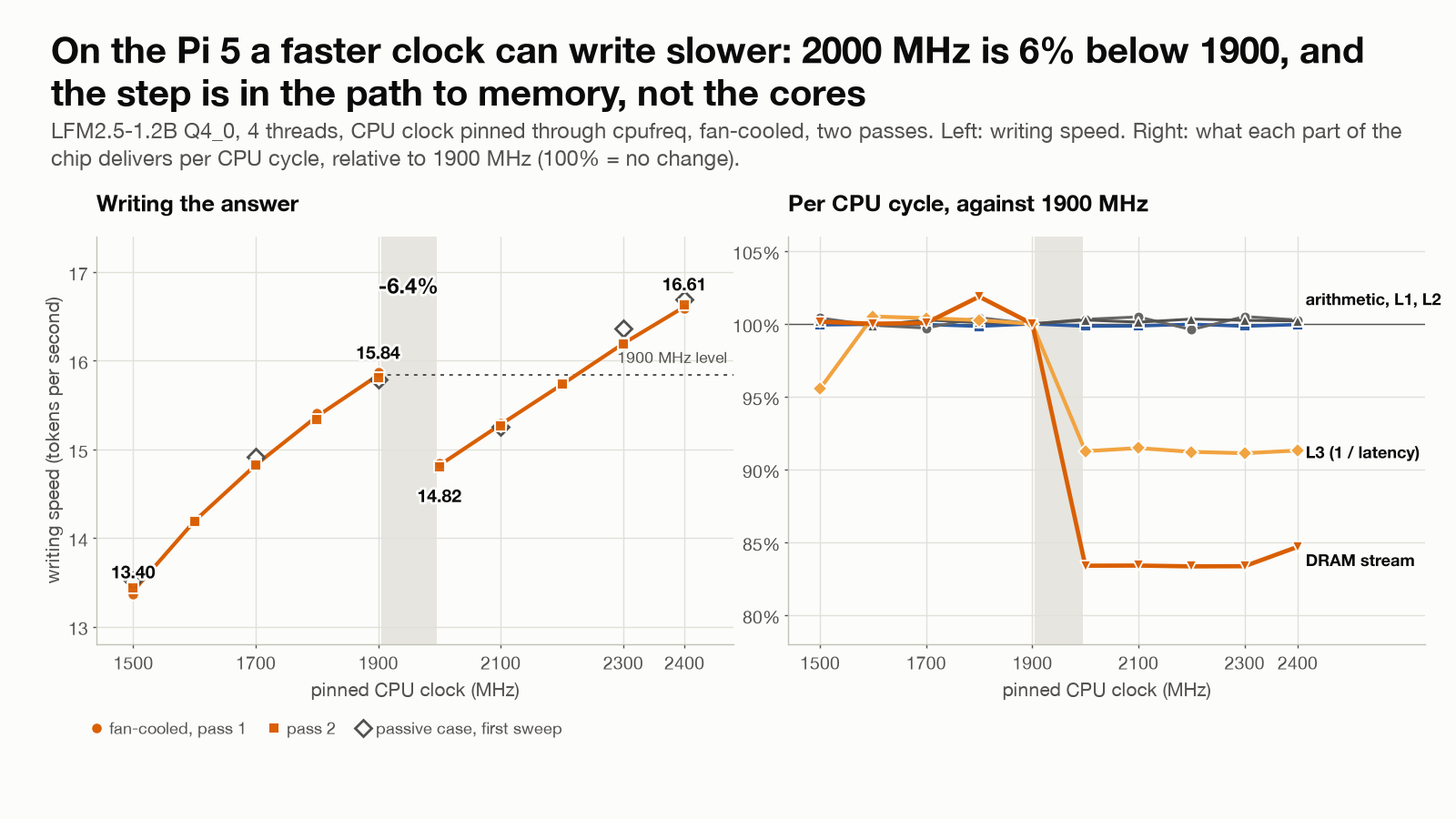
Mapped at every 100 MHz, the writing curve is not smooth. It rises from 13.4 tokens per second at 1500 MHz to 15.8 at 1900, falls 6.4% to 14.8 at 2000, and climbs again to 16.6 at 2400; 2000, 2100 and 2200 MHz are all slower than 1900, in both passes. The step is not noise: ten repetitions at each clock scatter by 0.08 to 0.09 tokens per second, the slowest of the ten at 1900 MHz (15.7) is faster than the fastest of the ten at 2000 (14.9), and the 1.02 tokens-per-second gap is about twelve standard deviations. (The first, coarser sweep showed a dip at 2100 MHz, which we put down to chance and then to heat; the fan-cooled repeat and the finer grid showed a step.)
Where is it? Not in the arithmetic: the int8 rate per MHz is the same at every clock, and the core voltage rises smoothly, 15 mV per 100 MHz, with no jump. A latency ladder points at the memory side. L1 and L2 behave identically at every clock, but from 2000 MHz up the shared L3 answers in 10% more CPU cycles and one thread streams 17% fewer bytes per cycle from DRAM, a ratio of 0.83, consistent with 5 to 6, per MHz. A read-only imitation of the model’s memory pattern (four threads reading 0.69 GB in 200 tensors with a barrier after each, no arithmetic) steps more (9.5% against the model’s 6.4%) and keeps a nearly constant ratio to the real writing speed across all ten clocks (within about 2%). A prediction written down beforehand also held: the 8-bit file, which reads 1.79 times the bytes per token, steps by 7.1% at the same clock, more than the 4-bit file’s 6.4%. So the step is in the path to memory. How far that goes:
- Observed: writing steps down 6.4% between 1900 and 2000 MHz in both passes; at that clock the shared L3’s latency in CPU cycles and the DRAM stream per cycle step too, while arithmetic, L1 and L2 do not.
- Supported: the step is in the memory path beyond the second-level cache, not in the cores.
- Not shown: why. A clock-domain ratio, a memory-controller or interconnect operating point, or something else could do it, and I tested one board on one firmware.
The practical reading: capped at 1900 MHz this Pi writes at 95 to 96% of its full-clock speed on 26% less power, and 2000 to 2200 MHz are slower than 1900 while drawing the same or more power. “More clock” is more speed only if every stage between the core and the data scales with it.
4-bit versus 8-bit
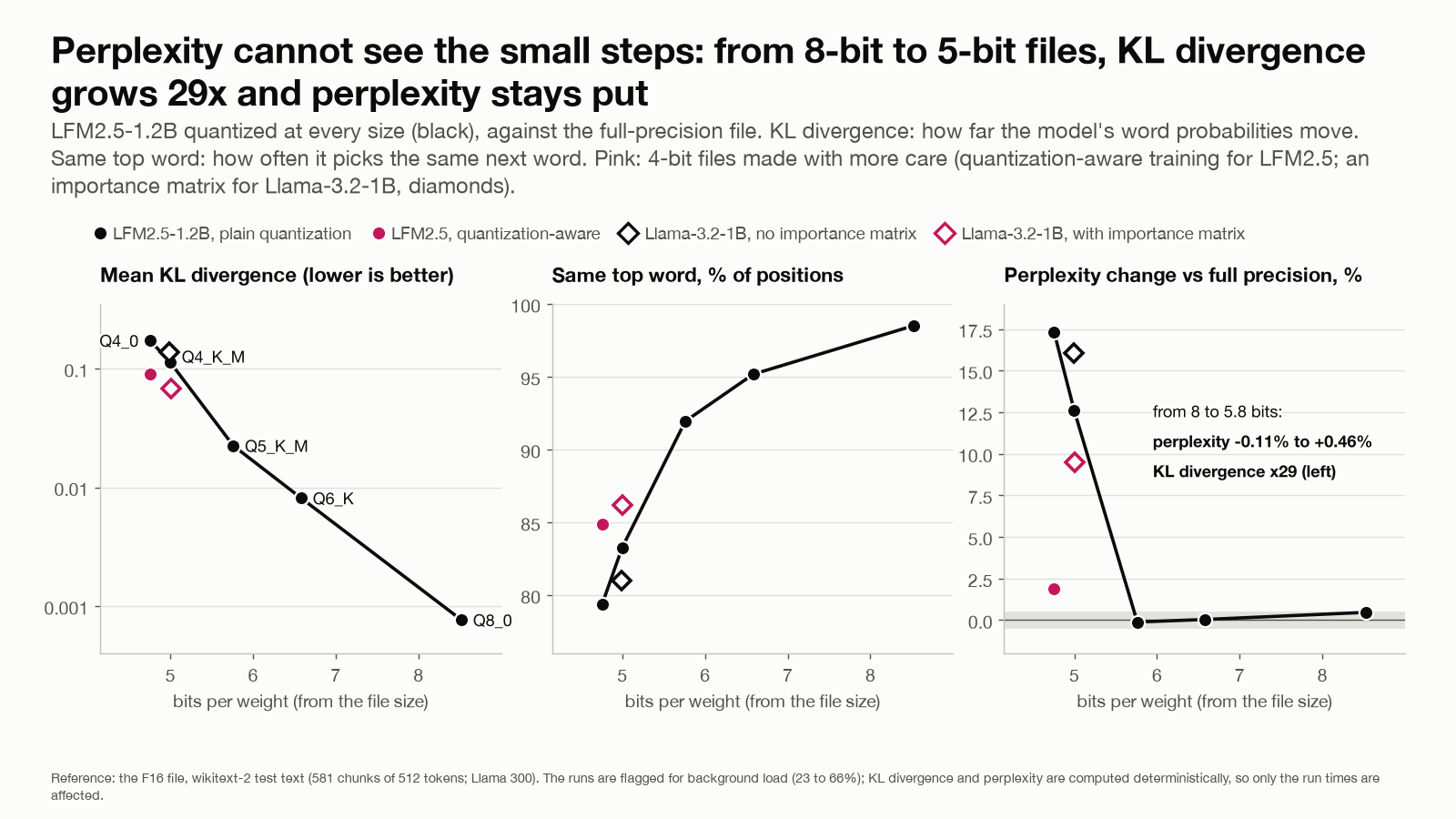
Speed is the bandwidth story again: 8-bit costs 7 to 10% on the UNO Q and 36 to 44% on the Pi and the Mac, and needs 1.7x the resident memory. Quality is harder to see, because three different things get called quality: numerical fidelity (does the smaller file agree with the full-precision one: top-word agreement, KL divergence), fit to text (perplexity) and task success (does it answer correctly). My task tests could not tell the 8-bit and 4-bit files apart: in blind votes I called 4 of 7 pairs equal, and our automatic checks scored them 13 and 12 of 24. The fidelity numbers are clear, against the full-precision file over a 300,000-token text: 8-bit keeps its top word 98.5% of the time, Q6_K 95.2%, Q5_K_M 92.0%, a quantization-aware 4-bit file 84.9%, Q4_K_M 83.3%, plain Q4_0 79.4%; perplexity stays within 0.5% of full precision down to Q5_K_M, then rises to +1.9% for the quantization-aware file and +12.6% and +17.3% for Q4_K_M and Q4_0. The full-precision file is a reference, not ground truth, and two near-tied words can flip a greedy answer without making it worse, so plain 4-bit ranking a different word first about one time in five measures how far the numbers moved, not how much worse the answers got. How the file is made matters as much as the bit count: an importance matrix lifts a 1B model’s 4-bit top-word agreement from 81.0% to 86.2%. One model family, on encyclopedia text.
Same weights, different words
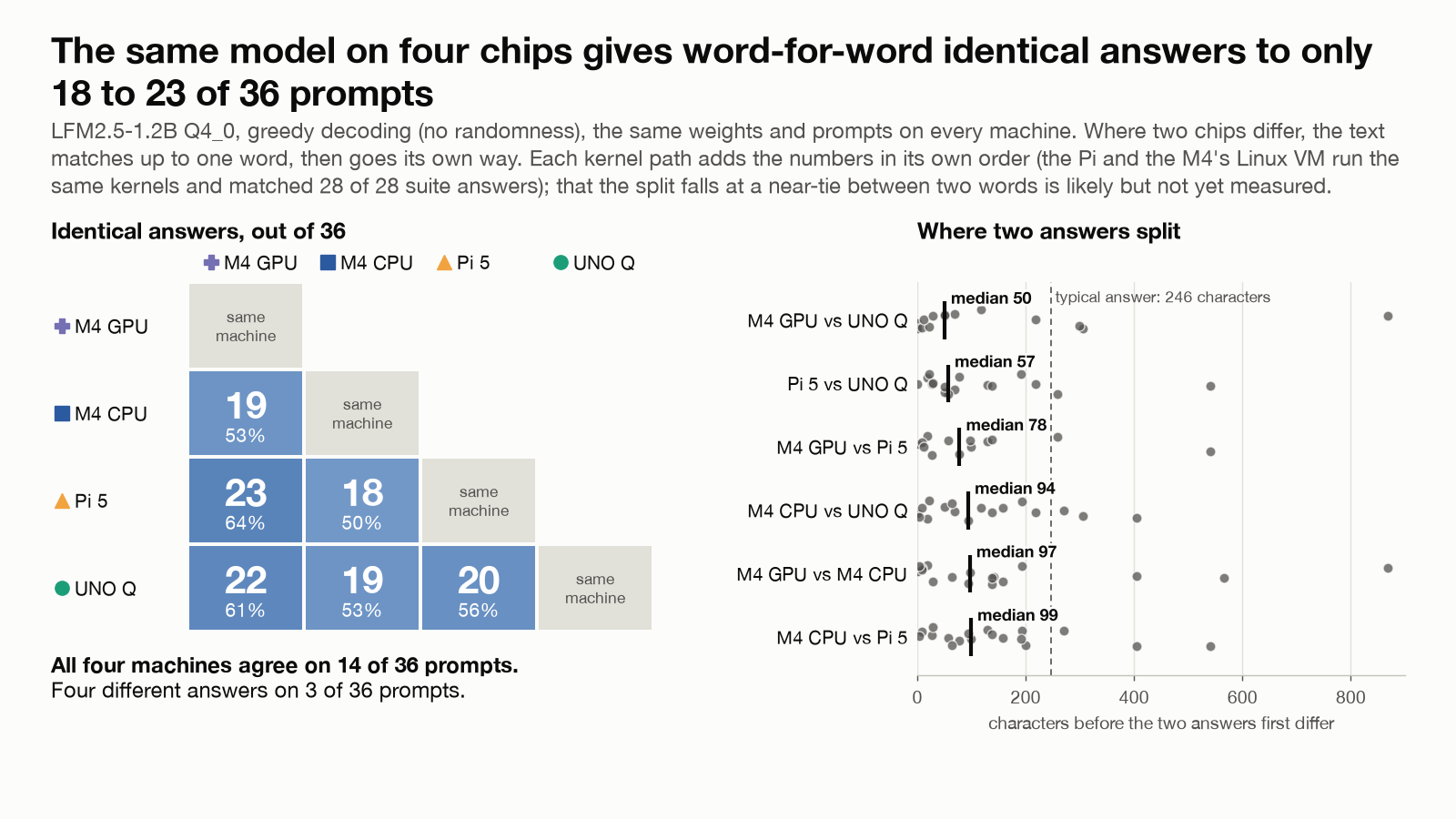
Same model file, greedy decoding, 36 prompts: any two chips write word for word the same answer on half to two thirds of them; on one machine the text repeats exactly, 52 of 52. In these tests the kernel path explains the differences better than the chip does: the Pi writes the same 28 of 28 answers as the M4’s Linux VM, which runs the same kernel library on different silicon, and 24 to 25 of 28 as the Mac GPU and CPU, whose kernels differ. That does not show hardware never matters (one model, a small prompt set). Where the addition order differs, the texts probably split at a close call between two words; I have not measured that. The verdicts do not split: all three chip families give the same pass/fail result on at least 23 of 24 checks.
Batching: predict, then measure
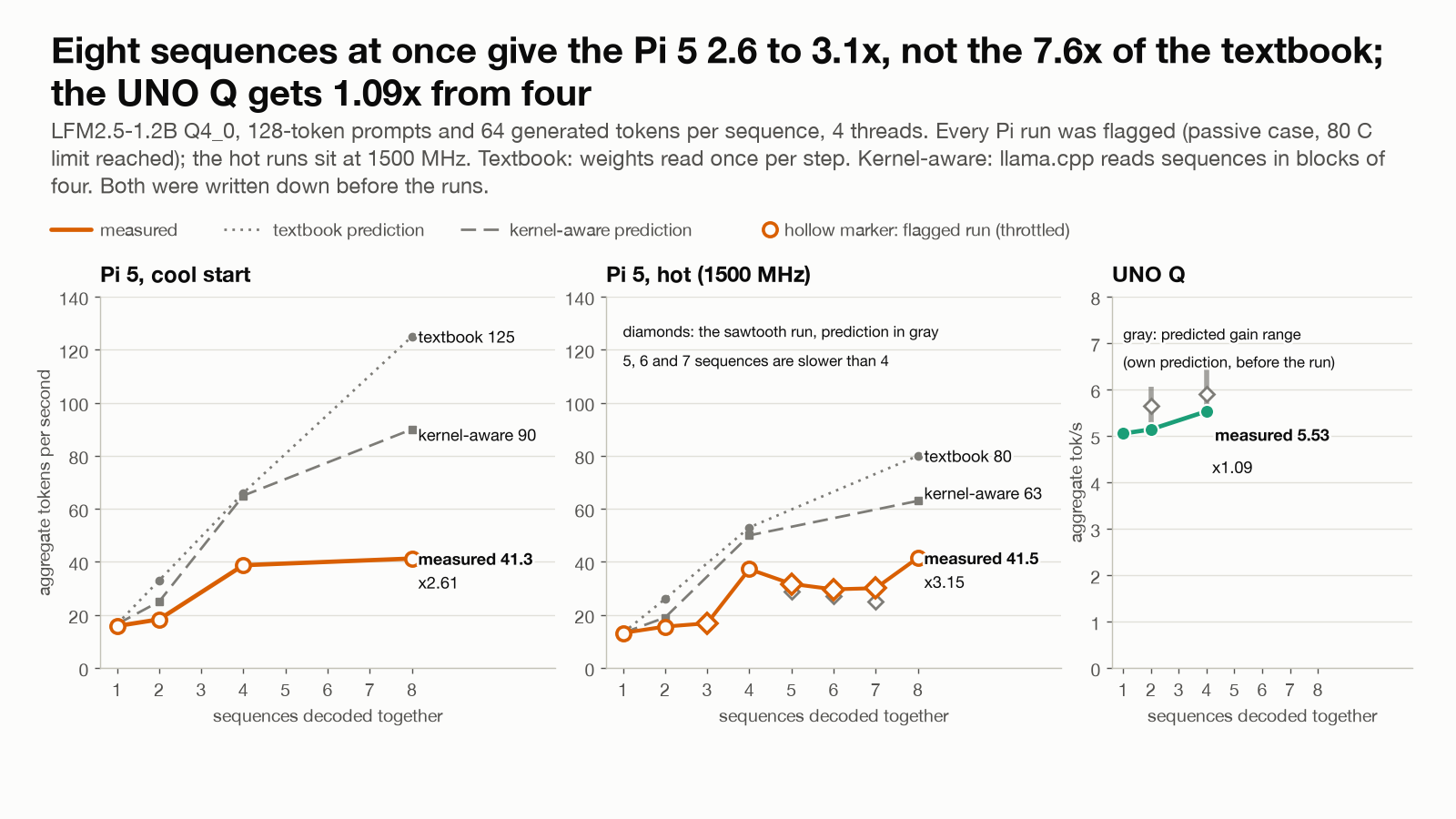
Decoding several conversations at once lets a memory-bound chip read each weight once for all of them: a naive roofline promises up to 8x at 8 streams. Reading llama.cpp’s repacked kernel before the run said otherwise: it handles streams in blocks of 4 and sends leftovers through single-row passes, so the gain should be a sawtooth. The Pi measured 15.8, 18.3, 38.8 and 41.3 tokens per second in aggregate for 1, 2, 4 and 8 streams (2.6x at 8), and 5 to 7 streams were slower than 4. Every run was on the passive Pi and reached its 80 C limit, so all are flagged: read them as the shape of the curve, not as steady-state speeds. The hot runs at 1500 MHz show the same shape. The UNO Q, with no idle arithmetic to share, gains 1.09x at 4 streams.
The biggest models that fit
The sharpest test of “speed follows bytes per token” is a mixture-of-experts model, which stores many experts but reads only a few for each token. LFM2-8B-A1B (8.3B parameters, about 1.5B active per token) writes 8.9 to 9.4 tokens per second on the passive Pi, 3.8 to 3.95x the dense 7B, for 4.05x fewer bytes read per token: 95% of the bytes ratio, against about 10 predicted before the run for the throttled clock. By file size alone it should have been slower than the 7B. Prompt reading gains less, 2.5x.
It also showed what the capacity rule misses. The 4.7 GB file fits the Pi’s 8 GB at rest, but llama.cpp’s default load builds a repacked second copy first. With the file partly in the page cache, 7 of 12 loads swapped and 2 were killed by the kernel’s out-of-memory killer; loading without repacking was clean and cost 1.77x on prompt reading, almost nothing on writing. Fitting is not loading.
On the UNO Q the largest dense models that fit, a 3B and a 4B, run within 2% of the prediction (1.9 and 1.5 tokens per second writing) and use the same 41 to 42% of the bandwidth as the 1.2B, so the speed rule holds there with the UNO Q’s own efficiency. They fit. At 46 seconds just to read a smart-home instruction, they are not usable.
Is any of it useful?
For a smart-home command the 1B models name the right device almost every time (70 of 90 replies) and the right action almost never (15 of 90): the device name lands in the action field, so the automation would not run. In a lighter two-line format the best 1.2B model passes 4 of 5 requests and the sub-1B models stop following the format at all. On the UNO Q that costs 20 seconds per request.
The first fix we tried was one worked example in the instructions. It did nothing: 5 of 30 right actions without it and 5 of 30 with it, 15 and 20 of 120 over twenty commands, and the prediction written beforehand, over 60%, failed. What worked was constraining the reply itself: llama-server can force the output to follow a JSON schema built from the prompt’s own device and action lists, and that gave 28 of 30, and 103 of 120 over twenty commands, with nothing extra to read. The fix was in the runtime, not in a bigger chip.
And most of the 20 seconds can go. llama-server can keep the processed instructions and reuse them, but with its defaults this model reused nothing: its hybrid layers can only be rewound to a saved checkpoint, and the server’s log shows the default checkpoint landing a few tokens past the point where two commands start to differ. A micro-batch of 8 tokens (-ub 8) moves a checkpoint early enough: 109 of 121 tokens reused, the first word in 1.5 to 1.9 seconds instead of 16.3 to 17.0, five commands in 41 seconds instead of 101. A model with attention layers only reuses by default.
Energy: what a token costs
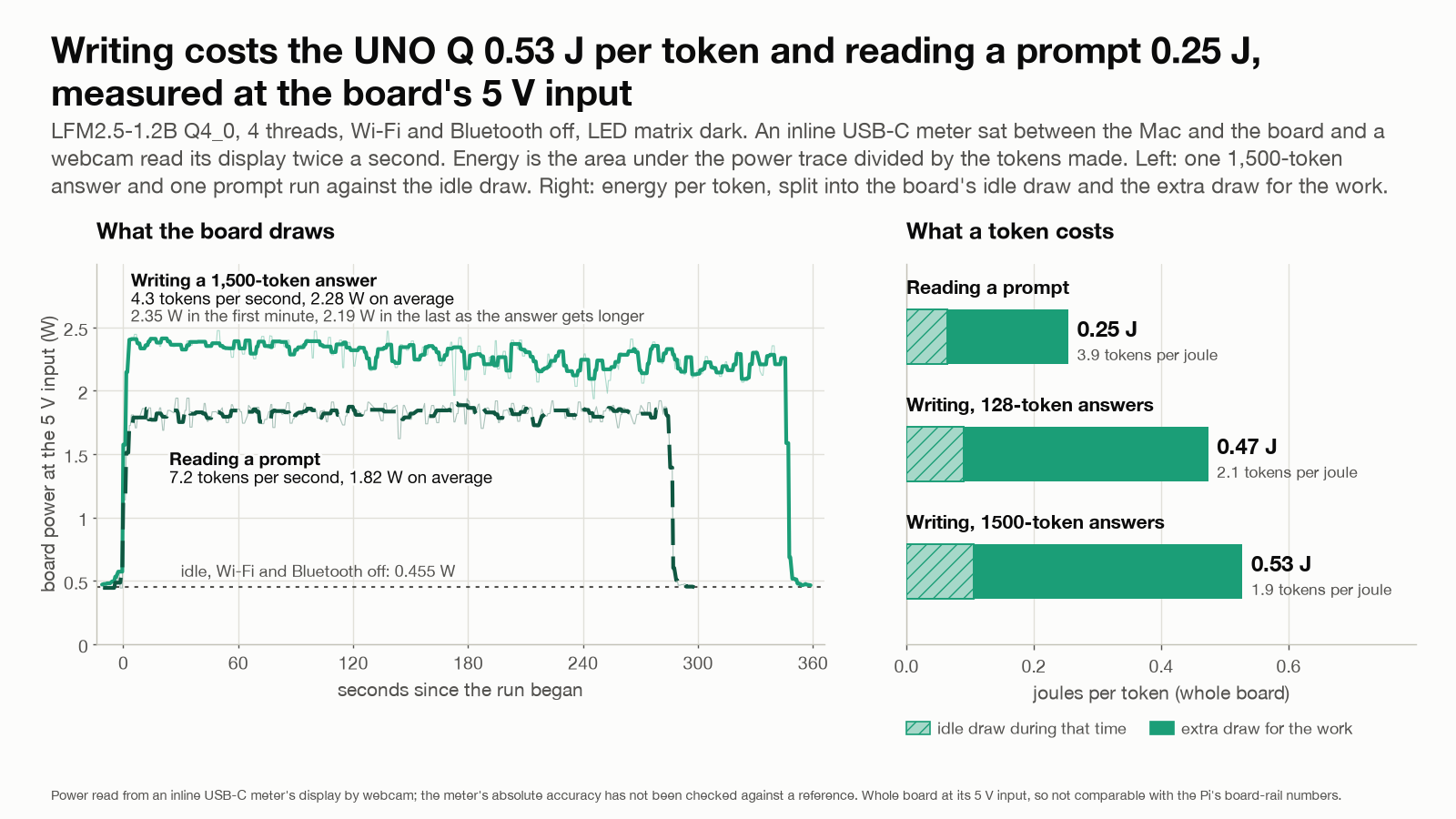
The UNO Q has no power sensor, so I measured it from outside: an inline USB-C meter between the Mac’s port and the board, its display read by a desk webcam twice a second (my choice; Claude Code wrote the reader). A reading counts only if the meter’s watts equal its volts times its amps within 3%, and a run’s energy is the area under the power trace. That shows the display is read consistently, not that the meter is accurate: all three numbers come from the same circuit. I had the LED animation killed (Claude Code flashed an empty sketch to the microcontroller). The first run started with Wi-Fi and Bluetooth on; I asked why not switch them off for every run, so we stopped it, kept its files marked as aborted, and restarted with them off. They cost 0.047 W at idle, 9% of it; idle with them off is 0.455 W.
Writing a 1,500-token reply, the board draws 2.28 W at 4.33 tokens per second: 0.53 J per token of board-input energy, idle draw included (1.9 tokens per joule), or 0.42 J above idle (2.4 tokens per joule). The first answers “what does this device spend to write a token”, the second “what does inference add to a device that is already on”; three runs agree within 0.7%. At the 128-token length the usual benchmark uses, it draws 2.43 W at 5.13 tokens per second: 0.47 J per token. Reading a prompt draws less, 1.82 W, but runs faster, 7.18 tokens per second, so a prompt token costs 0.25 J, 0.48 times a written one. Power falls 7 to 9% along a long answer (2.35 W to 2.19 W in the first run) as the speed falls with the growing context.
This board is slow rather than frugal: it adds about 1.8 to 2.0 W on top of idle to write 4 to 5 tokens per second. Because the cause of the slowness is still an inference, I make no projection of what a faster kernel would cost in joules.
I wrote the prediction first, and it missed: 1.3 to 1.8 W and 2.9 to 4.0 tokens per joule while writing, against 2.28 W and 1.90 measured. The article that gave the one published UNO Q speed I matched above also says about 1.4 W under load, for a different model, and I could not find how it measured; I did not reproduce that. And I have not checked the meter against a reference instrument: its readings agree with each other, and my summed energy agrees with its own charge counter within 0.8 to 2.3%, but that would not catch a meter that is wrong in the same way everywhere.
On the Pi’s board rails a 1.2B model gives about 2.5 tokens per joule over a whole run, about 2.7 to 3.0 counting only the generation windows. The cheap lever is the clock: pinned at 1900 MHz the rails averaged 4.6 W against 6.2 W at 2400 for 4% less writing speed, which is 3.45 against 2.66 tokens per joule (whole-run power), the best of the six clocks tried. The Pi’s figures are its board rails only, with no power supply or USB, and the UNO Q’s are the whole board at its 5 V input, so the two cannot be compared yet. The Pi needs the same meter first.
How solid each finding is
Three labels. Repeated: the same measurement agreed across two or more runs under the same conditions. Replicated: the result appeared again with a changed workload or method. Exploratory: one run, or too few to give a spread.
| Finding | What backs it | Evidence |
|---|---|---|
| The Pi’s writing speed steps down 6.4% from 1900 to 2000 MHz | Ten repetitions per clock in two passes; the 8-bit file steps 7.1%; a memory-only imitation steps | Repeated, replicated; one board |
| The UNO Q is not limited by bandwidth or multipliers | 41% of the read rate, 34% of the multiply rate; the 8-bit file keeps 93%; threads scale 3.7 to 3.8x | Replicated by three tests, one run each |
| Instruction overhead is why | Instruction counts; the Pi forced onto the same kernels; no counters | Exploratory |
| The Pi and the M4 are limited by bandwidth | 81 to 94% of the read rate; the 8-bit file slows about as the bytes predict; threads flatten; the mixture-of-experts model follows bytes | Replicated, several runs |
| No direct temperature effect at a pinned clock | Two passes, two coolings, 51 to 81 C, within about 1% | Repeated |
| Throttling with and without a fan | One run per configuration | Exploratory |
| UNO Q energy per token | Three 1,500-token runs within 0.7%; one 128-token run; one meter, unchecked | Repeated at 1,500 tokens, otherwise exploratory |
| The quantization ladder, same answers across chips, the smart-home fixes | One model family or one greedy sample per prompt; 20 commands | Exploratory |
Limitations
One board of each kind. The M4 numbers are good to about 5 to 10% run to run: a rerun at 8 to 9% background instead of 18 to 20% moved prompt reading by up to 10% and Metal writing by 6.5%, four repeats scattered 11% on prompt reading, and the Mac never reached a strictly quiet state; the M4 VM rows moved more, 7 to 33%. There was no temperature log during the hot ceiling measurement. The Pi’s clock step is one chip on one firmware, and its mechanism is inferred from latency and bandwidth, not observed. The UNO Q’s energy comes from one meter read by webcam and not checked against a reference instrument, and its idle reading drifted from 0.471 to 0.450 W across the session for a reason I did not find; the Pi’s energy is a different measuring point. The ceilings are reference rates, not hardware limits. The A53 explanation is inferred from instruction counts, not performance counters. Quantization: one model each, one text. Human quality: one rater, 24 votes. Apart from the M4’s Metal GPU, no GPU or NPU has run a language model here. Not covered: image, video and speech generation, phones, a voice-assistant pipeline, and sending requests from a small board to a bigger machine; small vision and speech models did run on the boards earlier in the project, but they are not part of this post. The register, the data and the harness are not published yet.
What I take from this
- Find the limiting resource before buying for it: the Pi and the M4 write about as fast as their memory reads, and the UNO Q does not.
- Log the clock the chip really delivers: more clock is more speed only if everything between the core and the data scales with it.
- Try the runtime settings before the hardware: on one chip, a constrained reply took a smart-home test from 5 of 30 right actions to 28, and a cached prompt cut the first word from 16 seconds to under 2.
Future work
- Read the UNO Q’s performance counters (instructions per cycle, cache misses, stalls) to test the instruction-overhead explanation.
- Check the Pi’s clock step on other devices: a second Pi 5, another firmware. Put the Pi on the same power meter as the UNO Q, and check the meter against a reference instrument.
- Start the qualitative measurements, and send the blind survey form out for other people to rate; so far the human ratings are one rater and 24 votes.
- Test additional devices that are more tailored for AI compute: order the Raspberry Pi AI HAT, and try the M4’s Neural Engine.
- Benchmark the M4 Mac mini against an M6 Mac mini.
- Set up a local model for my daily tasks, starting with controlling my home automation server.
- Publish the register, the raw data and the scripts, once they are scrubbed and pruned.
Adding another device
Adding a device to my harness is meant to be a profile, not a port: a transport profile plus a spec file with a named source for each field. One script installs the same llama.cpp release and Python environment, one pushes the same model files, and one suite script runs the same sequence everywhere, reference rates and kernel check included. A cost script turns bytes and operations per token plus the reference rates into the prediction I write down first; a verify script recomputes every registered number afterwards. What is device-specific today: real clock and throttle flags are read only on a Raspberry Pi; power is read from the Pi’s power chip and, on the UNO Q, from an external meter read by webcam; macOS gives no clock or temperature without sudo; the roofline program is ARM NEON only; and no GPU or NPU engine is wired in beyond one Vulkan vision test.
When I measure a new board, the first thing to record is not the tokens per second. It is the anchor I reproduced, the state log of the run, and the prediction I wrote down before it.
Update, 2026-10-09: I tightened the wording where it claimed more than the measurements show. The UNO Q explanation is now an inference with the missing test named, the projected kernel speedup is gone, the clock-step, quantization, kernel-path and heat claims are narrower, and the energy figure says what it includes. I also added the summary, the speed formula, the evidence table and a future work list.
How this was built: Claude Code wrote the harness, the analysis scripts, the figures, the program that reads the power meter’s display and the first drafts of this post, and started sub-agents for some runs and for audits of the numbers by separate AI reviewers. I defined the method (anchor to a published number first, log the device’s state on every run, write the prediction before the run, back every number with real data) and decided how to proceed at each step of the evaluation: what to measure next, what would count as a failure, which result to distrust and rerun, and to read the power meter with a webcam and switch the radios off for every run. I also set up the boards and their cooling, the meter and the camera, cast the blind votes, and reviewed every draft. Tested on the real hardware: every measurement above, on one UNO Q, one Pi 5 and one Mac mini M4 (the email times in the latency chart are computed from those speeds), and the UNO Q’s power with one USB meter that a webcam read. Not tested: a second board of each kind, that meter against a reference instrument, the Pi on the same meter, and what inside the Pi’s firmware changes at 2000 MHz.