My TV antenna lived behind my TV in the living room. Reception was inconsistent: if someone walked between the antenna and the window, the signal dropped. If I forgot to pull it out and angle it before sitting down, I got nothing.
I had an HDHomeRun FLEX DUO from a previous place where I had the antenna setup dialed in. I moved and never got around to setting it up again at the new apartment. The antenna behind the TV was the placeholder that never got fixed. This week I fixed it, and the same day I finished, I used it to watch the FIFA World Cup from an airport lounge and a plane on the way home from a trip, free, with no cable subscription. That felt worth writing up.
Moving the Antenna
The fix was moving the antenna somewhere it would not get shadowed. I put it in my bedroom closet. There is a small east-facing window in there for some reason, which turned out to be exactly what I needed. The antenna faces east and does not move.
After moving it I ran a full channel scan. 15+ channels locked with strong signal. KPYX-DT on UHF 557 MHz came in at ss=97/snq=100. KGO ABC at ss=97. KNTV NBC at ss=95. Reception is now consistent regardless of what is happening in the living room.
The HDHomeRun lives in the same closet. My desk is next to it and the eero PoE gateway is there, so I powered the HDHomeRun over the ethernet run using a PoE Texas 802.3af 12V splitter and a COOLM 5.5mm to 3.5mm barrel adapter to match the HDHomeRun’s power jack. No wall outlet needed. The eero reports 2.3W PoE draw, and one quirk: the FLEX DUO negotiates at 100 Mbps even though the link supports more. Fine for streaming — MPEG-2 OTA is well under 20 Mbps per channel.
The HDHomeRun Setup
The FLEX DUO (model HDFX-2US) sits on the network and streams to anything that can reach it over HTTP. It auto-discovers fine on the local network and has a simple REST API:
GET http://10.0.4.67/discover.json    # device info
GET http://10.0.4.67/lineup.json      # channel list with direct stream URLs
Each channel has a stream URL:
http://10.0.4.67:5004/auto/v[channel]
KTVU Fox 2 is /auto/v2.1, KGO ABC 7 is /auto/v7.1, and so on. No app required to start a stream. Any player that can open an HTTP URL works.
Full system layout:
flowchart LR
    ANT["OTA Antenna\n(bedroom closet\neast window)"]
    HDHR["HDHomeRun\nFLEX DUO\n10.0.4.67"]
    EERO["eero PoE\nGateway"]
    MAC["Mac Mini\n100.87.180.98\nTailscale"]
    REC["TV Recordings\n~/Movies/"]
    HTTP["HTTP server\n:8765"]
    PHONE["iPhone\nVLC"]

    ANT -->|coax| HDHR
    EERO <-->|ethernet + PoE| HDHR
    EERO -->|LAN| MAC
    MAC -->|ffmpeg| REC
    REC --> HTTP
    EERO -->|Tailscale\nsubnet route| PHONE
    HTTP -->|Tailscale| PHONE
Remote Access via Tailscale
The HDHomeRun app uses UDP broadcast for device discovery. That does not work over a VPN, so the app shows nothing when you are away from home. I spent a few minutes looking for a manual IP setting in the app before giving up.
The actual fix is Tailscale subnet routing. One command on the Mac mini:
tailscale set --advertise-routes=10.0.4.0/22
Then approve the route in the Tailscale admin console under Machines > Edit route settings. On the remote device, enable “Accept routes” in the Tailscale app.
After that, 10.0.4.67 is reachable from anywhere on the tailnet. The HDHomeRun app still will not auto-discover it, but that does not matter. The stream URLs work directly.
Watching Live TV Remotely
VLC on iOS is the right client for this. Network > Open Network Stream, paste a URL:
http://10.0.4.67:5004/auto/v7.1    # KGO ABC
http://10.0.4.67:5004/auto/v5.1    # KPIX CBS
http://10.0.4.67:5004/auto/v2.1    # KTVU Fox
http://10.0.4.67:5004/auto/v9.1    # KQED PBS
http://10.0.4.67:5004/auto/v11.1   # KNTV NBC
Works over Tailscale on cell or WiFi. The stream is raw MPEG-2 from the tuner with no re-encoding on the Mac side, so the Mac is not doing any work during playback.
Recording with ffmpeg
Claude Code wrote me a small Python wrapper around ffmpeg. The HDHomeRun tunes the channel, ffmpeg pulls the HTTP stream and writes an MKV. No subscriptions, no guide data yet.
python3 hdhr_record.py 7.1 1h      # record KGO for 1 hour
python3 hdhr_record.py 2.1 2h30m   # record Fox for 2.5 hours
Files land in ~/Movies/TV Recordings/ named by date, time, and channel. The container is MKV, video and audio copied directly, no transcoding.
To serve recordings remotely, a one-liner HTTP server on the Mac handles it. --bind keeps it on the Mac’s Tailscale address (the one in the URL below) instead of every interface; without it the server listens everywhere and has no authentication, so anything on the LAN could read the folder:
cd ~/Movies/TV\ Recordings && python3 -m http.server 8765 --bind 100.87.180.98
In VLC on iOS: http://100.87.180.98:8765/[filename].mkv. That is the Mac’s Tailscale IP, so it works from anywhere.
World Cup from the Airport and a Plane
I was flying home when I first used this. I watched the World Cup from the departure lounge and then on the plane, streaming live from the tuner at home over Tailscale. Without this setup I would have needed a paid streaming service. Instead it was free OTA.
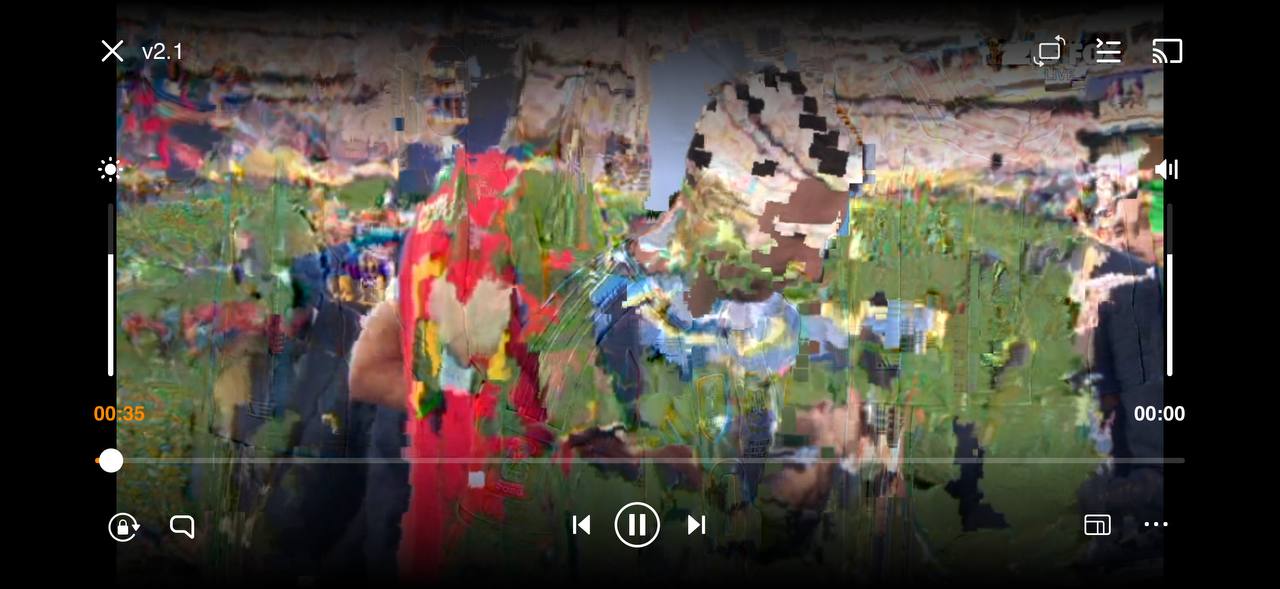
That said, airport WiFi and airplane connectivity are the worst-case scenario for live streaming. The feed dropped frames constantly. On the ground at the gate it was watchable but choppy. On the plane it was borderline. The picture kept locking up.
That is not a problem with the HDHomeRun or the routing. It is the right expectation: live streaming at 5+ Mbps over a congested shared network is going to struggle. The system did its job. The network was the constraint.
Why Recorded Playback Looks Better
The airport experience made this obvious. The recorded MKV plays noticeably cleaner than the same content streamed live, even though the source signal is identical.
What I saw on the live stream was macroblocking: the familiar blocky artifact where a 16x16 pixel block freezes or smears because the decoder doesn’t have the data it needs. The data either never arrived or arrived too late to show. The picture alone doesn’t tell me which, or where it went missing: airport WiFi, the path back home, or reception at the antenna. On airport WiFi it happened constantly.
A recording is different, but not because there are no packets. A file served over HTTP still crosses the network in packets, and it was the same bad network. The difference is the deadline. A live stream has to keep up with the broadcast and show each frame now, so late or lost data becomes a visible glitch. A recorded file can be buffered ahead, lost data can be retransmitted, and a slow stretch gets absorbed by the buffer, so it costs a pause instead of a smeared frame. A recording can also already contain errors from reception or from the recording itself; it doesn’t repair anything.
The source quality is the same. Buffered playback is just more forgiving than real-time delivery over a stressed connection. On a stable home network, live streaming is fine. On a plane, record first.
What Is Next
Guide data. Right now recording means knowing what time something is on. Schedules Direct has a free-ish API that would let me schedule recordings by show name.
Scheduled recording. The script already works with cron. The next step is a wrapper that looks up show times against the guide and schedules the job automatically.
Signal as a weather sensor. Separately from the TV use case, I have one tuner logging signal strength every 5 minutes across three frequencies: UHF 557 MHz, UHF 575 MHz, and VHF 207 MHz. RF attenuation from rain is frequency-dependent, so comparing UHF vs. VHF gives a way to separate weather effects from transmitter issues. Same idea as dual-band GPS receivers canceling ionospheric delay by comparing L1 and L2. More on that in a separate post.
Update: it didn’t produce a useful rain gauge. Rain attenuation at these frequencies is far too small for the HDHomeRun’s whole-percent signal readings to show. The follow-up has the arithmetic and two months of data.
How this was built: Claude Code wrote the recording script and set up the Tailscale route. I moved the antenna to the closet window, powered the HDHomeRun over PoE, and rescanned. Tested: live TV from an airport lounge and a plane, and recordings played back. Not tested: scheduled recordings.